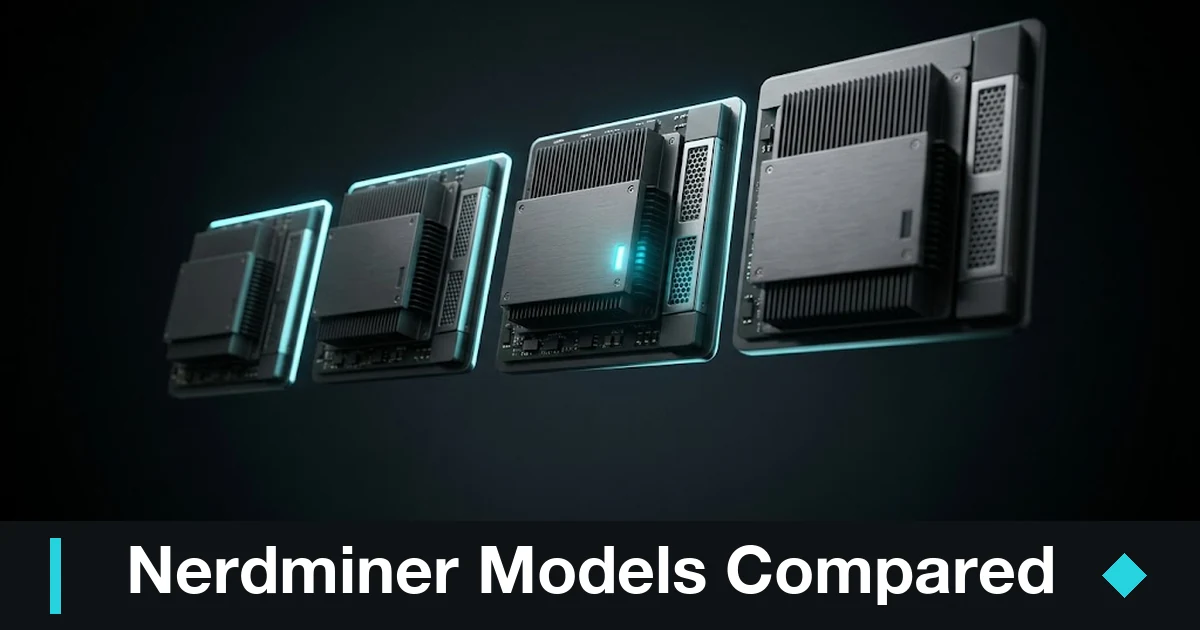
Nerdminer models
As you already know, Nerdminer devices were built to give you an educational, hands-on experience with Bitcoin mining, with no pretense of turning a real profit. The current model, built around the ESP32 T-Display S3 board, ships in several variants:
Nerdminer V2
With a hash rate of roughly 78 KH/s and a draw close to 0.7–1 W, this model stands out for its exceptional energy efficiency (around 0.01 J/GH) despite its tiny compute power. Its updated firmware and plug & play Wi-Fi setup make it ideal for anyone who wants to watch the mining process live without wrestling with the technical side.
| Feature | Specification |
|---|---|
| Hash rate | Roughly 78 KH/s |
| Power consumption | Between 0.7 and 1 W |
| Energy efficiency | Around 0.01 J/GH |
| Connectivity | Wi-Fi (802.11bgn) |
| Power input | USB-C |
| Firmware | Version 1.6.3 preinstalled |
| Dimensions | 50 x 50 x 80 mm (including fan) |
| Weight | 0.3 kg |
| Operating system | Linux |
| Included components | Heatsink, pin headers and cable |
Here are two links worth checking out on the Nerdminer project:
- Open-source project on GitHub
The official NerdMiner (v2) repository maintained by BitMaker-hub, where you’ll find the source code, documentation, and the latest updates. - Forum to learn about the Nerdminer
This Forocoches thread is full of real experiences, questions, and tips from people who have built and configured their own Nerdminer. A good place to learn and trade notes about the project.
Nerdminer Micro
This variant is even more stripped down, with no screen at all. It delivers around 50 KH/s on just 0.3 W. It’s the perfect pick if you want to play with the technology on the smallest possible budget. Its low draw and simplicity make it the educational option par excellence. View in store.
| Feature | Detail |
|---|---|
| Name | Nerdminer Micro |
| Hash rate | 50 KH/s (≈0.000055 TH/s) |
| Power draw | 0.3 W |
| Screen | No |
| Design | Minimalist |
| Best for | Education and experimentation |
| Comment | “Its low draw and simplicity make it the educational option par excellence.” |
Nerdminer DUO
By packing two modules into a single device, the DUO doubles the hash rate to roughly 156 KH/s and adds a second screen so you can watch mining stats in real time. The DUO version blends function and looks, giving you a complete read-out of your mining stats.
| Feature | Detail |
|---|---|
| Name | Nerdminer Duo |
| Mining modules | 2 integrated modules to double the processing power |
| Hash rate | Roughly 156 KH/s |
| Screens | Dual screen for real-time stats display |
| Stats display | Real-time monitoring of hash rate, temperature, power draw, and other parameters |
| Connectivity | Built-in Ethernet plus an option for Wi-Fi, making it easy to connect to mining pools and local networks |
| OS / Firmware | Proprietary Linux-based firmware, tuned for mining performance |
Nerdminer v3
You may have come across mentions of the Nerdminer v3 in a forum, on a website, or in some store, but the truth about this version of the device is very different from what they’d have you believe. I break it all down here: NerdMiner v3: does it exist, and where can you buy it?
Mining power
To show what these hash values mean for profitability, here’s a short Python snippet that estimates the expected time to find a block, assuming a fixed network hash rate. Tweak the variables to match reality:
import math

# Configuration for Nerdminer V2 (78 KH/s)
device_hash_rate = 78e3        # in H/s (78 KH/s)
# Assume a Bitcoin network hash rate of 150e18 H/s (example value)
network_hash_rate = 150e18     # in H/s
block_time = 600               # average block time in seconds (10 minutes)

# Probability of finding a block on each attempt
prob = device_hash_rate / network_hash_rate
# Expected time (in seconds) to find a block
expected_time_seconds = block_time / prob if prob != 0 else float('inf')
print(f"Expected time to find a block: {expected_time_seconds:.2e} seconds")
The output of this script is a reminder that, in practical terms, the odds of a Nerdminer ever finding a block are essentially nil, which reaffirms its educational and symbolic role.
Alternatives to the Nerdminer
Nerdminers are appealing for their low cost and low draw, but there are other options in the mini-mining space that pack a lot more compute while keeping the DIY spirit. The ones I’d single out:
Bitaxe/NerdAxe
These devices pair the ESP32 microcontroller with an ASIC chip — the Bitmain BM1366 or BM1370, for example — which lets them reach hash rates in the order of hundreds of gigahashes per second.
“With a Bitaxe or NerdAxe you get performance up to 10 million times higher than a Nerdminer, though they’re still a long way off the high-end commercial ASICs.”
| Feature | Detail |
|---|---|
| Name | Bitaxe Gamma 601 BTC Miner |
| Hash rate | 1.2 TH/s |
| Power consumption | 18 W/TH (roughly 21.6 W total) |
| ASIC chip | BM1370 |
| Connectivity | Wi-Fi 2.4G |
| Feature | Detail |
|---|---|
| Name | NerdAxe Miner |
| Device type | Bitcoin ASIC miner and expansion board for the NerdMiner |
| Hash rate | 500 GH/s |
| ASIC chip | Bitmain BM1366AL (based on the S19XP BM1366) |
| Screen | 1.9-inch IPS display with full-color graphics and two accessible buttons |
| Connectivity | 2.4 GHz Wi-Fi |
| Power supply | Requires 5 V DC at at least 4 A, via barrel connector (2.5/5.5 mm) |
| Setup | Easy setup through the AxeOS portal with built-in monitoring via a web interface |
GekkoScience Compac F
This is an ASIC-based USB miner (Bitmain BM1397) that delivers a steady hash rate between 200 and 350 GH/s, with the catch that it needs to be plugged into a PC or a Raspberry Pi to run.
“The Compac F shows how a USB device can shake up small-scale mining, even if setting it up is more technical.”
| Feature | Detail |
|---|---|
| Name | Compac F |
| Device type | ASIC-based USB miner |
| ASIC chip | Bitmain BM1397 |
| Hash rate | 200 – 350 GH/s |
| Connection | USB (requires a PC or Raspberry Pi) |
| Requirements | A PC or Raspberry Pi to run |
| Setup | More technical, aimed at experienced users |
| Use case | Small-scale mining and exploring new mining setups |
| Upsides | Portability, low draw, and room to experiment with custom configurations |
| Considerations | Needs technical setup and extra hardware (PC or Raspberry Pi) |
Goldshell Mini-DOGE
Aimed at altcoin mining (Litecoin/Dogecoin), the Goldshell Mini-DOGE III is a mini ASIC that reaches up to 700 MH/s on the Scrypt algorithm, drawing around 400 W.
“Although it costs more, Goldshell devices offer moderate potential returns in altcoin markets.”
| Feature | Detail |
|---|---|
| Name | Goldshell Mini-DOGE III |
| Device type | Mini ASIC aimed at altcoins (Dogecoin / Litecoin) |
| Algorithm | Scrypt |
| Hash rate | Up to 700 MH/s |
| Power consumption | Roughly 400 W |
| Connectivity | Wi-Fi 2.4G (Wi-Fi version) |
| Operating mode | Dual: tuned for both Dogecoin and Litecoin mining |
| Version | Improved over the Mini-DOGE II |
| Applications | Altcoin mining, especially Dogecoin and Litecoin |
| Profitability | Moderate potential in altcoin markets, despite the higher price |
Device comparison
To make the options easier to see at a glance, here’s a comparison table covering the things that matter: price, performance, power draw, efficiency, ease of setup, compatibility, and profitability.
| Aspect | Nerdminer V2 (~78 KH/s) | Bitaxe/NerdAxe (500 GH – 1.2 TH) | GekkoScience Compac F (USB) | Goldshell Mini-DOGE III (Scrypt) |
|---|---|---|---|---|
| Price | ~€30–50 (full kit) Micro: €10–30 DUO: ~€84 | €80–200 depending on model Kit ~€100–130 (500 GH/s) Gamma: ~€185 | $100–150 per unit Optional USB hub: ~€80 | ~€570 (without PSU) Or ~€650–800 with PSU |
| Hash rate | ≈78 KH/s (0.000078 TH/s) Micro: ~50 KH/s | 0.5–1.2 TH/s (500,000–1,200,000 KH/s) | 200–350 GH/s | 700 MH/s (Scrypt) |
| Power draw | ≈1 W (V2) ≈0.3 W (Micro) | 12–20 W (by model/overclock) | Between 5 W and 15 W | ~400 W |
| Energy efficiency | ≈12.8 J/GH | ~14 J/TH (excellent, comparable to large ASICs) | ≈37 J/GH (can improve with OC and cooling) | ≈0.57 J/MH |
| Ease of setup | Very high: plug & play over Wi-Fi, intuitive web interface | Medium: needs kit assembly and configuration via AxeOS | Medium/low: configured through a PC/RPi, with driver and software (CGMiner) installation | High: built-in web interface, similar to setting up a router |
| Compatibility | Bitcoin mining only (SHA-256), lottery-oriented | Mostly Bitcoin (SHA-256); supports solo-mining pools | Supports Bitcoin and other SHA-256 cryptocurrencies | Designed for Litecoin/Dogecoin (Scrypt) |
| Profitability | Essentially nil; educational and symbolic value | Very low; minimal pool earnings (< $3/month) | Low; very small earnings, payback in >1 year | Moderate; potential earnings of $5–$15 a day in altcoins |
| Support & community | Active DIY community, support on Discord/Reddit and GitHub | Collaborative support (OSMU) and technical forums | Community in forums and guides, but a more technical setup | Limited commercial support, but with an active user community |
| Availability | High; sold through specialist stores (Nerdminers.com, Bitronics) | Medium; kits available online, stock varies | Medium; sold through crypto stores and online | Medium; available on the official site and through resellers |
Better than buying a lottery miner is building one yourself. I’ve written this step-by-step tutorial to build a Nerdminer v2. It’s a project that teaches you a lot about mining, programming, and networking.
Nerdminer on Raspberry Pi (ShurikenPi)
Another way to get started with Bitcoin mini-mining is to repurpose a Raspberry Pi as a CPU “lottery miner.” The ShurikenPi project turns a Raspberry Pi (ideally a Pi 4) into a lightweight miner built on cpuminer-multi, inspired by the NerdMiner and Bitaxe ecosystem. Like the Nerdminers, its purpose is mainly educational and experimental: the chance of finding a block is practically zero, but it’s great for learning and tinkering on very few resources.
Basic requirements
- A Raspberry Pi 4 (the amount of RAM isn’t critical) with Raspberry Pi OS already installed.
- An internet connection and terminal access (directly or over SSH).
- A stable power supply and a microSD card with enough space.
- It’s best to dedicate the Pi to this, since mining eats CPU and can slow down other processes.
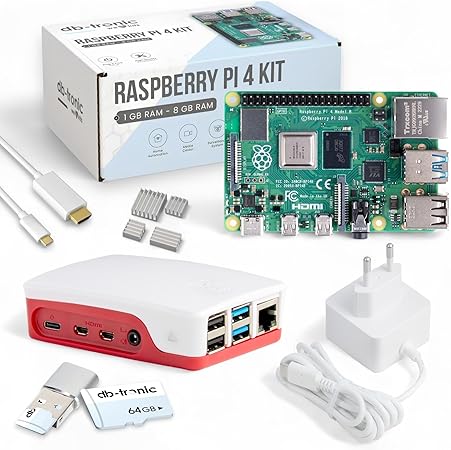
Raspberry Pi 4 4GB Starter Kit | USB-C 15W power supply | Case | 64 GB Edition | 4k HDMI cable | Heatsink set | Ras…
Raspberry Pi 4 4GB Starter Kit | USB-C 15W power supply |…
- ✔ Raspberry Pi 4 with 4 GB of RAM: a powerful single-board computer for versatile projects and applications.
- ✔ Official 15W power supply: a stable, reliable power source for your Raspberry Pi 4.
- ✔ Official case: protects your Raspberry Pi and ensures optimal cooling under heavy use.
Quick ShurikenPi install
Installation runs through an automatic script. From your Raspberry Pi’s terminal:
# Go to the HOME directory
cd ~

# Download the ShurikenPi installer
wget https://raw.githubusercontent.com/Urban-Hacker/shurikenpi.io/main/install.sh

# Make it executable
chmod +x ./install.sh

# Run the installer and start the wizard
./install.sh
Once the wizard finishes, ShurikenPi is installed in its directory (by default ~/shurikenpi/shurikenpi.io). From there you control the miner with the main script:
cd ~/shurikenpi/shurikenpi.io

# Start the miner
./shuriken.sh start

# Stop the miner
./shuriken.sh stop

# Check the status
./shuriken.sh status
ShurikenPi is still in beta and uses the Raspberry Pi’s CPU to mine Bitcoin, so its compute power is negligible against the network, just like the rest of the nerdminers.
A solid first step into crypto mining
As you already know, Nerdminer devices are an accessible, educational way into crypto mining. Their ability to find Bitcoin blocks is essentially nil, but their value is in letting you experiment and learn about blockchain on a minimal budget.
Alternatives like the Bitaxe/NerdAxe offer far more power, while devices such as the GekkoScience Compac F and the Goldshell Mini-DOGE let you explore altcoin mining with some expectation of return.
Keep one thing in mind: given how volatile the rewards are and how high mining difficulty runs, no device guarantees a safe profit. That’s why I always recommend running fresh profitability numbers and being honest about your real goal: is this education, a hobby, or a bet on decentralization?
Frequently asked questions
What Nerdminer models are there?
The current lineup is built on the ESP32 T-Display S3 board and comes in three variants: the Nerdminer V2 (~78 KH/s, with screen), the Nerdminer Micro (~50 KH/s, no screen, the cheapest), and the Nerdminer DUO (~156 KH/s, two modules and a dual screen).
Which Nerdminer model should I buy?
If you want to watch the mining live with no fuss, go for the V2 with its plug & play Wi-Fi setup. If you want the cheapest entry point and don’t care about a display, the Micro is the most educational option. The DUO is for anyone who wants double the hash rate and a richer real-time read-out.
Does the Nerdminer v3 exist?
Not as the official project would have you believe. The reality behind the “v3” is very different from what some stores and forums suggest. I break it down in detail in my dedicated article on the Nerdminer v3.
Is there a more powerful alternative to the Nerdminer?
Yes. The Bitaxe and NerdAxe pair the ESP32 with an ASIC and reach hundreds of GH/s up to 1.2 TH/s. The GekkoScience Compac F is a USB ASIC miner (200–350 GH/s) that needs a PC or Raspberry Pi, and the Goldshell Mini-DOGE III mines altcoins (Litecoin/Dogecoin) at up to 700 MH/s. All of them keep the DIY spirit while offering more compute.
Can a Nerdminer turn a profit?
No. The odds of finding a Bitcoin block with a Nerdminer are practically nil, so the value is educational and symbolic rather than financial. Devices like the Goldshell Mini-DOGE can earn a few dollars a day in altcoins, but for actual returns you’d need commercial-grade ASICs.
Can I turn a Raspberry Pi into a Nerdminer?
Yes, using the ShurikenPi project, which turns a Raspberry Pi (ideally a Pi 4) into a lightweight CPU lottery miner based on cpuminer-multi. Like the Nerdminers, the chance of finding a block is practically zero, but it’s a great way to learn and tinker with very little hardware.
Learn more about the Nerdminer