
Semantic SEO and semantic relevance
How semantically relevant is your page to a specific query? This is the core idea behind semantic SEO: ranking for what a page means, not just for the words it contains. In this article I build a tool in Python that measures exactly that: it computes the G-Score, a semantic relevance metric grounded in the same dot product mechanism Google uses inside its RankEmbed system. No access to any Google API: I use open-source embeddings and Docling to replicate the logic. If you care about how AI and search engines retrieve content through semantic similarity, this piece gives you the concrete technical foundation.
Google uses machine learning to do semantic matching, and documents surfaced in the antitrust trial revealed that it performs “semantic matching” by understanding the meaning of words and substituting analogous terms, so synonymous concepts get treated as equivalent. That means a query like “budget hotels” can find a page about “cheap accommodation” relevant even when the exact words don’t line up, because the engine recognizes the similarity in meaning.
For us SEOs, the obvious question follows: can we imitate this process to analyze our own content? The answer is yes. With embeddings (semantic vectors) we turn both queries and page content into numerical representations that capture their meaning. Compare those representations and you get a measure of how semantically related a page is to a given query.
In this technical walkthrough I’ll cover what embeddings are, how similarities are computed via the dot product, and how to build a homemade SEO tool that vectorizes content and produces a relevance score (which I’ll call the G-Score) close in spirit to the one Google relies on.
Fundamentals: text embeddings and semantic similarity
Embeddings is the term for vector representations of text in high-dimensional spaces. Put simply, an embedding turns a piece of text (a sentence, a paragraph, a whole document) into a vector of numbers. That vector acts as a “semantic fingerprint” of the text: if two texts mean similar things, their vectors sit close together or point in the same direction in the vector space, even when the actual words differ. Texts about different topics, on the other hand, produce vectors that are far apart or pointing in very different directions.
Picture a space with hundreds of dimensions (hard to visualize, but mathematically tractable). Each word or concept contributes something to certain dimensions of the vector. A well-trained embedding model will place the vectors for “cheap hotel” near “budget accommodation”, while “cheap hotel” ends up far from “sports car”. That happens because the model learns from the context of millions of examples which words and phrases carry related meanings.
For search engines, embeddings let them match results beyond literal text matching. Google introduced systems like RankBrain (in 2015) and more recently algorithms such as RankEmbed and MUM, which use embeddings and language models to understand never-before-seen queries and match them to relevant content even when the words don’t coincide exactly.
In an SEO context, understanding embeddings is valuable because it lets us measure the semantic similarity between search intent and our page content in a quantitative way.
Once we have vectors representing both the user’s query and a page’s content, how do we measure how alike they are? There are several ways to compute the distance or similarity between two vectors, but the most common are: cosine similarity, Euclidean distance, and the dot product.
In natural language processing tasks, cosine similarity has long been popular: you compute the cosine of the angle between two vectors, which tells you how aligned they are while ignoring differences in magnitude.
Over the last few years, though, it’s become clear that for certain applications (semantic search among them) the dot product can work better. The dot product is simply the sum of the element-wise products of two vectors, and it equals cosine similarity multiplied by the lengths of both vectors.
The dot product factors in not only the relative direction (the angle) but also the magnitude of the vectors. So if a document is rich in relevant content (which can produce a vector of larger magnitude), it scores higher under the dot product than a shorter document, even when both point in a similar direction. The dot product rewards the breadth or “weight” of the content, whereas cosine similarity treats a short paragraph and a long one the same as long as they say exactly the same thing.
Why does the choice of the dot product matter so much?
Because Google, according to information surfaced in the antitrust trial, measures semantic similarity between queries and documents using the dot product in its internal systems, not cosine similarity. Its RankEmbed system, which estimates the match between a query and a page (especially for short or generic queries), relies on this vector similarity measure. Plenty of SEO analysts have been computing cosine similarity between texts to gauge relevance, but if Google uses the dot product, it’s worth having our tools do the same so we align better with how it weighs content. With that in mind, in the sections below I’ll build a tool that applies these ideas: we’ll get embeddings for our pages and queries, and compute the dot product between them to get a score I’ll call the G-Score (named for this revealed semantic “Google Score”). To be clear, the G-Score is my analogy to Google’s internal system, not a metric Google publishes or has disclosed by name.
| Property | Cosine similarity | Dot product |
|---|---|---|
| What it measures | Angle between vectors (direction) | Angle + magnitude of the vectors |
| Value range | −1 to 1 (normalized) | Unbounded (depends on magnitude) |
| Effect of text length | Ignores text length | Favors richer, longer texts |
| When to use it | Comparing documents without penalizing short ones | Semantic search and ranking (Google’s RankEmbed) |
| Recommended model | all-MiniLM-L6-v2 (normalized vectors) | multi-qa-mpnet-base-dot-v1 (un-normalized vectors) |
The embedding model: multi-qa-mpnet-base-dot-v1 (multilingual and dot-product optimized)
You don’t need to train your own embedding model from scratch; high-quality pretrained models are available. For this project I’ll use multi-qa-mpnet-base-dot-v1, publicly available and a strong performer on semantic search tasks. Here’s why it’s a great fit:
- Built for question-and-answer search: this model comes from the Sentence Transformers family and was trained specifically for semantic search, using question-answer pairs. It was trained on 215 million (question, answer) pairs from a range of sources. So it has learned to align queries with texts that contain the answer or relevant information, exactly what we need to measure relevance between an SEO query and a page’s content. The volume of training data behind it is what makes its semantic understanding reliable.
- High-dimensional vectors: the model maps each text to a dense vector of 768 dimensions. That dimensionality lets it capture subtle nuances of meaning. You can think of each dimension as a “latent feature” of meaning (not directly interpretable), and with 768 of them the model has plenty of room to position each text conceptually. In practice, more dimensions usually translate into more capacity to represent complex similarities and differences between texts.
- Multilingual: although the model’s MPNet base was originally trained in English, this variant has been shown to work across several languages, which matters in multilingual SEO. Its vocabulary and multi-source training let it generate coherent embeddings for text in English, Spanish, and other common European languages. Documentation for similar models notes support for roughly 15 languages in their training data. That gives us confidence
multi-qa-mpnet-base-dot-v1can represent queries and pages across markets properly. With a multilingual model, you can vectorize content in different languages using a single tool. - Optimized for the dot product: one important detail is that this model is designed to use the dot product as its similarity measure. Its name even carries “dot“, and the model card states explicitly that it does not produce normalized embeddings (unit length) and that the recommended scoring function is the dot product. That’s perfect for our purpose, since we want to compute similarity the way Google would (inner product). If we used a model trained for cosine similarity, we’d have to normalize the vectors, but here we can use the raw vectors’ dot product directly as our relevance metric.
Extracting page content with Docling
The first step to vectorize and analyze web pages is to get their text content cleanly, without the noise of HTML, menus, or ads. For that I’ll use the Docling library, an IBM project built to parse documents in various formats (PDF, Word, HTML, and so on) and extract their content in structured form.
Docling makes scraping and HTML processing far simpler than hand-rolling regular expressions or using libraries like BeautifulSoup manually, because it identifies the main body of the document and converts it to plain text or Markdown while preserving structure (headings, paragraphs, lists, tables, and the like).
A few advantages of using Docling
It supports multiple formats (handy if you want to extract content not just from web pages but also from PDFs, DOCX files, etc.), it builds in some understanding of document layout (it respects reading order, headings, tables), and it can export to JSON or Markdown. In our case we hand it the URL of a web page and get back its text content ready to vectorize.
Here’s an example of how to use Docling to turn a page’s HTML into usable text:
# Step 1: install and import Docling
!pip install docling             # (run this if you don't have Docling installed)
from docling.document_converter import DocumentConverter

# Step 2: set up the document converter
converter = DocumentConverter()

# Step 3: specify the URL of the web page we want to extract
url = "https://www.example.com/my-page.html"

# Step 4: convert the content at the URL into a Docling document
result = converter.convert(url)

# Step 5: export the content to structured text (Markdown in this case)
markdown_content = result.document.export_to_markdown()

print(markdown_content[:500])  # print the first 500 characters as a sample
In the code above: we first install the docling library (if it isn’t already there) and import DocumentConverter. We create an instance of that converter, the main object for processing documents. With converter.convert(url) we pass the URL we care about; Docling will download the HTML and parse it automatically. The result (result) holds a processed document from which we can extract different representations. We use export_to_markdown() to get a Markdown string that preserves the content’s structure (## headings, paragraphs, etc.), though we could also use export_to_json() or similar methods for another format.
After running this, the variable markdown_content holds the page’s main text ready to use. If the page was an article, the Markdown will have its headings and paragraphs without the surrounding HTML. If you need plain text only, you could strip the Markdown syntax or use a different export method (extracting only the paragraph nodes, for example). For our purposes, Markdown is useful because it keeps a readable structure.
Note: the first time you use Docling it can take a moment, since it downloads some internal models to interpret documents (it has OCR components and others for PDFs). For simple HTML pages it’s fairly fast. Make sure to handle network errors (in case the URL doesn’t respond) and to have permission to scrape according to the policies of the site you analyze.
From text to vectors: the heart of semantic SEO
With our pages’ content as clean text, the next step is to turn both that content and the search query into numerical vectors (embeddings) using the multi-qa-mpnet-base-dot-v1 model. To make this easy I’ll use the sentence-transformers library, which offers a simple interface to load pretrained Hugging Face models and get embeddings.
First, let’s install and import the embedding model:
!pip install -U sentence-transformers   # install the Sentence Transformers library
from sentence_transformers import SentenceTransformer, util

# Load the pretrained model (this downloads the weights the first time)
model = SentenceTransformer('sentence-transformers/multi-qa-mpnet-base-dot-v1')
The model object now holds the neural network ready to generate embeddings. We use its encode() method to turn text into vectors. Here’s how to get the vector for a search query and for several web pages we’ve extracted:
# Example query and page contents
query = "cheap hotels in central London"  # an example query
pages_text = [page_content1, page_content2, page_content3]  # text extracted from 3 pages

# Step 1: get the embedding of the query
emb_query = model.encode(query)

# Step 2: get embeddings for each page (processes the whole list)
emb_pages = model.encode(pages_text)

# Check dimensions
print("Query vector dimension:", len(emb_query))
print("First page vector dimension:", len(emb_pages[0]))
In this snippet, query is a string with the user’s search (for example, “cheap hotels in central London”). Its embedding emb_query is a 768-dimension vector (each element a float) that semantically represents the meaning of “cheap hotels in central London”.
Meanwhile, pages_text is a list with the text extracted from three hypothetical web pages. When we pass that list to model.encode(), the function processes each element and returns a list (or NumPy array) of three vectors, emb_pages[0], emb_pages[1], and emb_pages[2], each corresponding to the embedding of the page at the same position in the original list.
Notice we’re using the model in batch mode, encoding several pages at once. The
sentence-transformerslibrary handles this efficiently (even splitting into smaller batches if the pages are very long or the GPU has little memory). It also handles tokenization and truncation: since transformer-based models have a token limit (usually 512 input tokens for this model), if a page’s content is very long it gets truncated to the allowed limit.
When we print the vector dimensions, we should see 768 in both cases, confirming that the query and the pages are represented in the same 768-dimension vector space.
Computing semantic similarity: the dot product and defining the G-Score
Now that we have the query and the pages represented as vectors, we need to quantify how close they are semantically. As I discussed in the fundamentals section, we’ll use the dot product as our similarity measure. Quick reminder of the dot-product formula for two vectors A and B of dimension n:
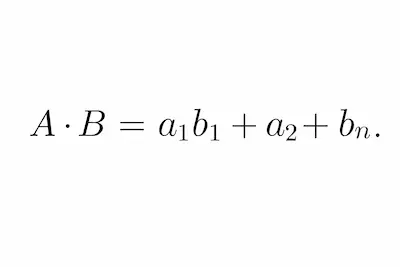
We multiply each component of vector A by the corresponding component of vector B and sum all those products. The result is a single number (a scalar). If A and B are aligned (B largely contains the same “ideas” as A), many of those individual products will be large (because both components are high, or both low but positive, and so on), and the total will be high. If A and B talk about very different things, some components can cancel others (positives with negatives), and the total tends to be low or even negative. In semantic terms, a higher dot product means the query and the page share more meaning in common.
Since we’re not normalizing the vectors, magnitude influences the result: a longer page or one with more relevant content can produce a vector of larger norm and therefore a larger dot product with the query, which reflects a degree of “importance” or “weight” of the content in the vector space. This fits Google’s philosophy of rewarding quality, complete content: using the inner product, we account not only for the page pointing in the query’s topical direction but also for how much “mass” of content it carries in that direction.
Now let’s define the G-Score. I’ll call the G-Score the semantic similarity score between a query and a page computed via the dot product of their embeddings. So for a query q and a page d:
G-Score(q, d) = embedding(q) · embedding(d)
In our case, since the embeddings are 768-dimension vectors, the G-Score is the sum of 768 products (each query dimension multiplied by the corresponding page dimension). The higher the G-Score, the more semantically relevant we consider that page for the given query.
Why call it the G-Score? The G is for Google. We know Google computes some kind of internal score to order its results. According to the trial revelations, part of that score comes from comparing embeddings (of the query and the candidate documents, for instance) using the dot product. Google combines this semantic score with many other factors (PageRank, user data, freshness, and so on), but we can read the query-page dot product as a proxy for that semantic component. In our simplified tool, the G-Score is directly the criterion for deciding which page is most relevant to a query, emulating that semantic part of Google’s algorithm. Again, it’s an analogy, not a number Google has published.
The G-Score isn’t bounded between 0 and 1 the way cosine similarity is; its values can vary widely (depending on the vectors’ magnitudes). A G-Score that’s high in absolute value indicates high similarity (and a negative one would suggest the query and the document are topically opposed or out of context with each other, which in practice is rare for reasonably related topics). For ranking across several pages, the relative value is what matters: we sort from highest to lowest G-Score.
Here’s how we compute the G-Score in Python from the embeddings we obtained:
import numpy as np

# Assume we already have emb_query (the query vector)
# and emb_pages (a list/array of page vectors) from the previous step.

# Compute the dot product between the query and each page
scores = np.dot(emb_pages, emb_query)  # matrix-vector product: an array of scores

# Find the index of the highest-scoring page
best_index = int(np.argmax(scores))
best_score = scores[best_index]

print("G-Score of the query against each page:", scores)
print(f"Index of the most relevant page: {best_index} (score = {best_score:.4f})")
Here we use numpy.dot to compute, in vectorized form, the dot product between the query vector (emb_query) and each of the page vectors in emb_pages. If emb_pages is an array of shape (N, 768) (N pages, 768 dimensions each) and emb_query is of shape (768,), the result scores is an array of shape (N,) where each position i is the dot product between the query and page i. We could have computed each dot product in a loop, but the vectorized operation is more concise and efficient.
Then we use np.argmax(scores) to get the index of the highest value in the scores array. That’s the page with the highest semantic similarity to the query, the most relevant page by G-Score. We print the scores (useful during testing) and flag the maximum and its value.
At this point we’ve essentially implemented the core of the tool: given a query and several vectorized pages, we can compute their G-Score and determine which page “wins” on semantic relevance for that query.
Putting it together: a full Python example
Now let’s tie all the steps into a cohesive script. This example assumes we have a set of web pages (URLs) whose content we want to analyze against a given query. I’ll show what a small command-line tool (CLI) might look like, where the user enters a query and the program responds with the most relevant page by computed G-Score.
import numpy as np
from docling.document_converter import DocumentConverter
from sentence_transformers import SentenceTransformer

# Initialize tools
converter = DocumentConverter()
model = SentenceTransformer('sentence-transformers/multi-qa-mpnet-base-dot-v1')

# List of URLs to analyze (example)
urls = [
    "https://www.example.com/page1.html",
    "https://www.example.com/page2.html",
    "https://www.example.com/page3.html"
]

# 1. Extract content from each page with Docling
pages_text = []
for url in urls:
    try:
        result = converter.convert(url)
        text_md = result.document.export_to_markdown()
        pages_text.append(text_md)
    except Exception as e:
        print(f"Error extracting {url}: {e}")
        pages_text.append("")  # on failure, append an empty string

# 2. Vectorize all the pages in the list
emb_pages = model.encode(pages_text)

# 3. Ask the user to enter a query
query = input("Please enter the search query: ")

# 4. Vectorize the query
emb_query = model.encode(query)

# 5. Compute the G-Score of the query against each page
scores = np.dot(emb_pages, emb_query)

# 6. Identify the page with the highest G-Score
best_idx = int(np.argmax(scores))
best_url = urls[best_idx]
best_score = scores[best_idx]

# 7. Show the result
print(f"\nMost relevant page for the query '{query}':")
print(f"- URL: {best_url}")
print(f"- G-Score: {best_score:.4f}")
How the flow works
First we define the list of pages to evaluate (here three example URLs, but you could load dozens or hundreds from a sitemap, a site listing, and so on). Then, for each URL, we use Docling to get its text content and store it in the pages_text list. We handle possible extraction errors (if a URL doesn’t respond or Docling hits an unsupported format, we catch the exception and continue so the whole process doesn’t abort).
With the content list ready, we move to vectorization: we get embeddings for all pages in a single call (model.encode(pages_text)) and store the result in emb_pages.
Next, we ask the user to enter a search query (using input() to simulate a simple interactive CLI). We vectorize the query into emb_query.
We compute the G-Scores with the same technique as before (dot product between emb_query and each vector in emb_pages). We find the index of the best result and then get its URL. Finally, we print the result: the URL of the most relevant page and its G-Score value.
Demo: suppose the example pages are about travel in London, with content like:
- page1: a guide to budget hotels in London.
- page2: the history of London (not much related to hotels).
- page3: a list of cheap guesthouses in central London.
If the user enters the query “cheap hotels in central London“, we’d expect page1 and page3 to get higher G-Scores than page2, since they share more vocabulary and semantic context with the query. The script returns the URL with the highest score, probably page3 (if its content is tightly focused on central, budget guesthouses/hotels). The SEO can then confirm page3 is the best aligned with that search intent, and maybe decide to optimize it further or link to it internally from other relevant pages.
Next steps
We’ve built a technical tool that lets an SEO measure semantic relevance between a query and the content of web pages, using the same core logic modern search engines rely on. Through embeddings generated by the multi-qa-mpnet-base-dot-v1 model and dot-product similarity, we get a score (the G-Score) that tells us how well each page answers the intent behind a query. This approach goes beyond keyword density, evaluating the contextual understanding of the text. If you want the broader picture of where this sits in an AI-driven workflow, it pairs well with automating the repetitive parts of SEO so you can spend more time on judgment. It sits inside a bigger picture: see how to use AI across the whole SEO workflow, and how AI agents for SEO can run a measurement like this one on a schedule.
A few closing thoughts and possible extensions of this work:
- Interpreting the G-Score: a high G-Score suggests strong topical alignment, but remember that real SEO involves many factors. This tool focuses on content relevance. You can use it, for example, to spot which pages on your site might compete for the same intent (content clusters), or to identify semantic gaps (queries for which your content has a low G-Score, hinting you might be missing depth on that topic).
- Multilingual optimization: we used a multilingual model, so the same method applies whether you want to evaluate pages in English, Spanish, or other languages. You could even compare a query in one language with content in another, since the vector space is shared (cross-lingual matching won’t be perfect, but it can surface ideas, like comparing Spanish vs. English content on the same topic).
- Scalability: for a handful of pages the solution is instant. To scan hundreds or thousands of pages, you’d want to optimize extraction (multiple threads or processes for Docling, or pre-extracting and saving the texts) and vectorization (use a GPU, smaller batches if memory is tight, and so on). Once you have the embeddings, comparing against different queries is very fast (a simple matrix multiplication). That opens the door to integrating this tool into larger pipelines, like a web app where you enter a query and get back a ranking of a site’s pages, or even feeding the embeddings into an internal search engine with a vector index.
- Improving the metric: the dot product is a good metric, per Google and our own reasoning. To fine-tune relevance further, you could combine the G-Score with other signals: a small boost for pages with authority (backlinks) or whose meta title contains query terms. That moves you into composite-score territory. As an isolated experiment, it’s interesting to see how much pure semantic alignment we can capture with embeddings alone.
Interpreting the G-Score: rough reference ranges
The G-Score isn’t normalized between 0 and 1 like cosine similarity. Its values depend on the model and the type of content. As a practical reference for the multi-qa-mpnet-base-dot-v1 model:
| G-Score range | Interpretation | Recommended action |
|---|---|---|
| > 60 | Very high semantic relevance | Page well aligned. Reinforce with interlinking and expand the topic. |
| 40 – 60 | Acceptable relevance | Covers the topic but could improve coverage or semantic depth. |
| 20 – 40 | Weak relevance | Brushes the topic. Check for cannibalization or whether it’s worth optimizing. |
| < 20 | No semantic alignment | The page doesn’t answer that query. Drop it or create new content. |
Note: calibrate these ranges against your own pages that already rank in your niche. The values are indicative.
If you want to push this further into autonomous workflows, the natural next move is wrapping the tool in SEO agents that run the analysis across a whole site and flag the gaps for you.
Frequently asked questions
What is semantic relevance in SEO?
Semantic relevance in SEO is the measure of how aligned a page’s meaning is with the user’s search intent, beyond literal keyword matching. Google uses machine learning models (such as RankEmbed) that compare vector representations of the query and the document to determine this relevance.
What is the G-Score and what is it for in SEO?
The G-Score is a semantic relevance metric that computes the dot product between the embedding of a search query and the embedding of a page’s content. A high G-Score means the page is well aligned with the search intent. It helps identify which pages on a site best answer a query, detect content gaps, and prevent cannibalization. The name is my analogy to Google’s internal system, not a metric Google has disclosed.
What’s the difference between cosine similarity and the dot product in SEO?
Cosine similarity measures only the angle between two vectors, ignoring their magnitude. The dot product factors in both direction and magnitude, so it favors documents with more relevant content. Google uses the dot product in RankEmbed: a long, topically rich page scores higher than a short paragraph on the same topic.
Which embedding model should I use for semantic SEO?
For semantic SEO with the dot product, multi-qa-mpnet-base-dot-v1 is a solid choice: trained on 215 million question-answer pairs, it produces 768-dimension vectors, supports multiple languages, and is optimized for the dot product. If you need speed over precision, all-MiniLM-L6-v2 is lighter, though it uses cosine similarity.
How do you use Docling to extract content from web pages?
Docling is an IBM library that parses HTML, PDF, and other formats, extracting the main text without navigation or ad noise. Install it with pip install docling, instantiate DocumentConverter(), call converter.convert(url), and export with result.document.export_to_markdown(). The result is structured text ready to vectorize with sentence-transformers.
Continue reading about SEO & AI

LLM SEO With and Without RAG: A Practitioner’s Guide

NAS for SEO: How I Turn a Synology Into a 24/7 SEO Server

How to Install n8n on a Synology NAS (Container Manager, Step by Step)

n8n for SEO: 6 Workflows I Run on My NAS (and the Data Limit That Breaks Them)

AI Agents for SEO: Real Use Cases and How to Implement Them

How to use AI for SEO: the practical guide
